
Auto-Scroll TikTok with One Click
Overview
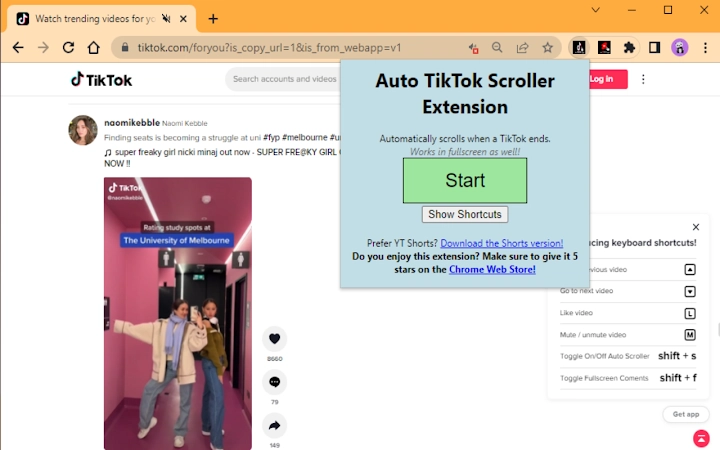
The Auto-TikTok-Scroller is a lightweight Chrome extension designed to automate the scrolling experience on TikTok. Its primary function is to trigger the next video playback immediately after the current one ends, eliminating the need to manually scroll or tap. This feature is particularly useful for users who wish to consume content passively, such as while studying, working, or multitasking across multiple tasks.
Targeted at casual users and students, the tool supports seamless background viewing, enabling uninterrupted content consumption without switching tabs or losing focus. It is especially beneficial in scenarios where attention is divided between academic work and entertainment. The extension operates directly within the Chrome browser, requiring no additional software or installations beyond the browser itself.
Developed by Tyson3101, the tool is open-source and hosted on GitHub, allowing transparency and community contributions. The developer did not provide additional details about the project’s origin or development process. Real-world use cases include long study sessions, content research, or simply enjoying a continuous stream of TikToks without interruptions.
Key Features & Capabilities
- Automatic Video Progression – When a TikTok video finishes, the extension triggers the next video to load and play automatically, reducing manual interaction.
- Seamless Browser Integration – Designed specifically for Chrome, the extension runs in the background without disrupting other tabs or browser functions.
- Low Resource Footprint – At just 1.2 MB, the extension is lightweight and does not significantly impact browser performance.
- Open-Source Accessibility – The source code is publicly available on GitHub, enabling transparency and allowing users to report issues or suggest improvements.
- Simple Activation – Once installed, the extension activates automatically on TikTok’s website with no complex setup required.
Users can leverage this tool during study breaks, while waiting for downloads, or during repetitive tasks. The automation helps maintain a steady content flow, reducing cognitive load from repeated manual actions. For students, it offers a way to stay entertained without switching contexts, though caution is advised regarding academic integrity.
User Interface, Workflow & Performance
The Auto-TikTok-Scroller operates entirely in the background with no visible interface or dashboard. Users do not interact with a UI beyond installation and activation within Chrome’s extension menu. Navigation is minimal, relying on the browser’s default behavior, which contributes to a streamlined workflow.
Since the extension runs in the browser environment, its interaction with TikTok’s interface is limited to detecting video end events and triggering the next load. No additional windows, pop-ups, or settings are displayed. This design ensures that the user experience remains unobtrusive and focused on content consumption.
The developer did not specify resource usage details. However, based on its file size and functionality, the extension is expected to have minimal impact on CPU or RAM. Performance observations are based on general software behavior patterns. Stability is likely maintained through direct integration with TikTok’s standard playback mechanisms, though real-world reliability may vary depending on TikTok’s interface updates.
Compatibility & System Requirements
The extension is compatible with Windows, Mac, and Linux operating systems, as it runs within the Chrome browser. The software version is 1.0.0, and the installation size is 1.2 MB. No additional system requirements were listed by the developer.
Exact system requirements were not provided. Compatibility information was partially provided, confirming support for major desktop platforms through Chrome. Users should ensure their Chrome browser is up to date to maintain full functionality. The extension does not require administrator privileges or external dependencies.
Pros and Cons
Pros
- Automatically advances TikTok videos without manual input
- Minimal file size (1.2 MB) and low system impact
- Open-source and transparent development via GitHub
- Simple setup with no configuration needed
- Works across Windows, Mac, and Linux via Chrome
Cons
- No visible user interface or settings panel
- Dependent on TikTok’s interface stability
- May not function if TikTok updates its playback structure
- Not suitable for users who prefer manual control
- No built-in feedback or status indicators
FAQ Section
Is Auto-TikTok-Scroller compatible with all devices?
The extension runs on any device that supports Chrome, including Windows, Mac, and Linux systems. However, it is limited to the desktop browser version of TikTok.
Is the extension safe to use?
Yes, the extension is open-source and available on GitHub. Users can review the code to verify its integrity. It does not collect personal data or track browsing behavior.
How often does the extension update?
Updates are released as needed, primarily to maintain compatibility with TikTok’s platform changes. Users are encouraged to check the GitHub repository for the latest version.
Can I use this extension offline?
No, the extension requires an active internet connection and access to TikTok’s website to function. It cannot operate without an online connection.
What license type does the extension use?
The extension is distributed under an open-source license, as indicated by its public GitHub repository. Specific license details can be found in the project’s repository.
Final Thoughts + CTA
The Auto-TikTok-Scroller delivers a focused, no-frills solution for users who want to automate their TikTok viewing experience. Its simplicity, low footprint, and cross-platform support make it a practical tool for students and casual viewers alike. While it lacks advanced features or customization, it excels in its core purpose: seamless auto-scrolling.
For those seeking a hands-free way to watch TikToks without distractions, this extension offers a reliable and secure option. It’s especially valuable in multitasking scenarios where minimizing interaction is key. The open-source nature adds credibility, and the developer’s transparency enhances trust.
Download Auto-TikTok-Scroller now







